Frontend system design interviews trip up even strong engineers. Not because the problems are impossible, but because most candidates lack a structure. They jump straight into implementation details, miss entire dimensions of the problem, and run out of things to say at exactly the wrong moment.
The RADIO framework is a structured approach that covers everything interviewers care about — in the right order. Once you internalize it, you'll never blank out in a system design interview again.
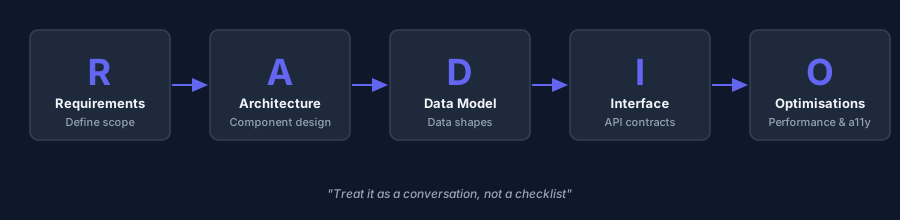
What Is the RADIO Framework?
RADIO stands for:
| Letter | Step | What you're doing |
|---|---|---|
| R | Requirements | Define scope — what are we building? |
| A | Architecture | High-level component design |
| D | Data Model | What data exists and how is it structured? |
| I | Interface | APIs, props, events between components |
| O | Optimizations | Performance, a11y, edge cases |
This isn't a rigid checklist — it's a conversation framework. You work through it collaboratively with the interviewer, asking questions, making explicit tradeoffs, and adjusting scope.
Why Structure Matters More Than Solutions
System design interviews have no single correct answer. What interviewers are evaluating:
- Can you drive the conversation proactively?
- Do you ask the right clarifying questions before diving in?
- Can you identify and articulate tradeoffs?
- Do you think about users, performance, and edge cases — not just the happy path?
- Can you work at the right level of abstraction?
A mediocre solution with great structure often beats a clever solution with no structure.
R — Requirements
Goal: Narrow the scope before you build anything.
Start by clarifying what you're designing. Ask questions like:
- What are the core features we need to support?
- What can we deprioritise for now?
- Who is the target user — mobile? desktop? both?
- What scale are we designing for? Thousands of users or millions?
- Are there accessibility requirements?
- What browsers/devices need to be supported?
Then split requirements into:
Functional — what the system does:
"Users can search, see a dropdown of suggestions, navigate with keyboard, and select a result"
Non-functional — how well it does it:
"Results should appear within 100ms. Works on mobile and keyboard-only. Degrades gracefully offline."
Don't spend more than 3-4 minutes here. Get agreement and move on.
A — Architecture
Goal: Draw the high-level components and their relationships.
For frontend system design, architecture means:
- What major UI components exist?
- How do they communicate (props, context, events, API calls)?
- What external systems do they talk to (API, WebSocket, cache)?
- Is there a client-side state layer (Redux, Zustand, React Query)?
Sketch it out — even verbally. For an autocomplete, you might say:
"There's an
Inputcomponent that manages user typing, aSuggestionListthat renders results, and auseAutocompletehook that owns the fetch logic, debouncing, and keyboard state. On every keystroke, the hook calls the search API with debounce, updates suggestions, and exposes keyboard navigation handlers."
That's architecture. You don't need UML. You need components + connections.
D — Data Model
Goal: Define what data flows through the system and how it's shaped.
For frontend, this means:
- What does the API response look like?
- What does component/client state look like?
- How is data transformed before rendering?
// API response
type Suggestion = {
  id: string;
  label: string;
  url: string;
  category?: 'page' | 'person' | 'document';
};

// Client state (inside the hook)
type AutocompleteState = {
  query: string;
  suggestions: Suggestion[];
  activeIndex: number;
  status: 'idle' | 'loading' | 'success' | 'error';
};
Think about:
- Normalisation — do you need to deduplicate or flatten data?
- Caching — do you store previous results to avoid redundant fetches?
- Optimistic updates — do you update the UI before the server confirms?
I — Interface
Goal: Define how components and systems talk to each other.
This is the API design step. For a component, it means its props interface:
interface AutocompleteProps {
  onSearch: (query: string) => Promise<Suggestion[]>;
  onSelect: (suggestion: Suggestion) => void;
  placeholder?: string;
  debounceMs?: number;
  maxSuggestions?: number;
}
For server communication, define the API:
GET /api/search?q={query}&limit={n}

Response: {
  suggestions: Suggestion[];
  totalCount: number;
}
Also think about:
- Events — what does the component emit? (
onSelect,onDismiss,onChange) - Keyboard interface — arrows navigate, Enter selects, Escape closes
- Error states — what does the API surface expose when something fails?
O — Optimisations
Goal: Discuss improvements that make the system production-ready.
This is where you demonstrate senior-level thinking. Cover at least 3-5 of these areas:
Performance
- Debouncing — don't fire on every keystroke
- Caching — store results for repeated queries
- Request cancellation — cancel in-flight fetches when the query changes (
AbortController) - Lazy loading — load heavy components only when needed
- Virtualisation — render only visible items in long lists
Accessibility (a11y)
role="combobox"andaria-expandedon the inputrole="listbox"androle="option"on suggestionsaria-activedescendanttracks keyboard-highlighted item- Announce result count to screen readers
Reliability
- Error handling — show a fallback UI if the API fails
- Offline — degrade gracefully if there's no network
- Empty states — what shows when there are no results?
- Loading states — avoid layout shift during fetches
Security
- Sanitise rendered HTML — if suggestions contain user-generated content
- Rate limiting — client-side request throttling on top of debounce
- CSRF — for mutations (not reads, but worth mentioning)
Internationalisation (i18n)
- RTL layout support
- Translated placeholder, aria-labels
- Character encoding for non-ASCII queries
The RADIO Walkthrough: Autocomplete Example
Here's how you'd use it in practice:
R — Requirements
"We're building the search autocomplete seen on Google. Core features: show suggestions as the user types, keyboard navigation, click to navigate to a result. Out of scope for now: spell correction, personalisation. Supports desktop and mobile. Results within 100ms felt-latency."
A — Architecture
"Three components:
SearchInput,SuggestionDropdown,SuggestionItem. AuseAutocompletehook owns state, debouncing, fetching, keyboard nav. On mount, focus the input. On type, debounce 150ms, fetch/api/search?q=. On select, navigate."
D — Data Model
"API returns
{ suggestions: [{id, label, url, icon?}] }. Client state: query string, suggestions array, activeIndex (-1 = none), loading bool."
I — Interface
"Input emits
onChange,onKeyDown. Hook exposessuggestions,activeIndex,onSelect,onKeyDownhandler. Component acceptsonSearchandonSelectcallbacks so it's reusable."
O — Optimisations
"Debounce 150ms. Cache query → results in a Map. AbortController cancels stale requests. ARIA combobox/listbox pattern for screen readers. Show spinner during loading, 'No results' for empty, error toast on failure."
That's a complete, structured answer in 15-20 minutes.
Common Mistakes to Avoid
Jumping to code immediately — discuss architecture first, code second (or not at all).
Ignoring non-functional requirements — "it works" isn't enough. Talk about performance, a11y, and error states.
Over-scoping — don't design Google's entire search engine. Agree on scope, then go deep.
Being too vague — "I'd add caching" → explain where, how, and what the cache key is.
Monologuing — this is a conversation. Ask the interviewer what they want to go deeper on.
Summary
- RADIO = Requirements, Architecture, Data Model, Interface, Optimisations
- Define scope first — ask questions before designing
- Architecture = major components + how they connect
- Data model = shape of API responses + client state
- Interface = props, events, API contracts
- Optimisations = the senior-level layer: performance, a11y, error states, i18n
- Treat it as a collaborative conversation, not a presentation
The Series: Frontend System Design Interview Questions
- The RADIO Framework (this article)
- Design an Autocomplete / Typeahead (coming soon)
- Design a News Feed (Facebook/Twitter) (coming soon)
- Design a Chat Application (Messenger/Slack) (coming soon)