The news feed is one of the most common frontend system design questions at FAANG and growth-stage companies. It's a deceptively deep problem — what looks like "a list of posts" involves infinite scroll, real-time updates, optimistic rendering, virtualization, and media performance.
This article walks through a full RADIO-framework answer. If you're unfamiliar with RADIO, start here.
R — Requirements
Functional requirements:
- Display a scrollable feed of posts from people the user follows
- Each post shows: author avatar + name, timestamp, text content, media (image/video), like/comment/share counts and actions
- Infinite scroll — more posts load automatically as the user scrolls down
- New posts appear at the top in real-time (or with a "N new posts" prompt)
- Users can like/comment/share a post without leaving the feed
- Clicking a post opens a detail view
Non-functional requirements:
- Initial feed loads in under 2 seconds on a 4G connection
- Scroll should stay at 60fps — no jank from layout thrash or heavy renders
- Works on mobile and desktop
- Accessible to keyboard and screen reader users
- Graceful degradation when offline
Out of scope:
- Feed ranking algorithm (that's backend)
- Posting new content
- Notifications
- Stories / Reels
A — Architecture
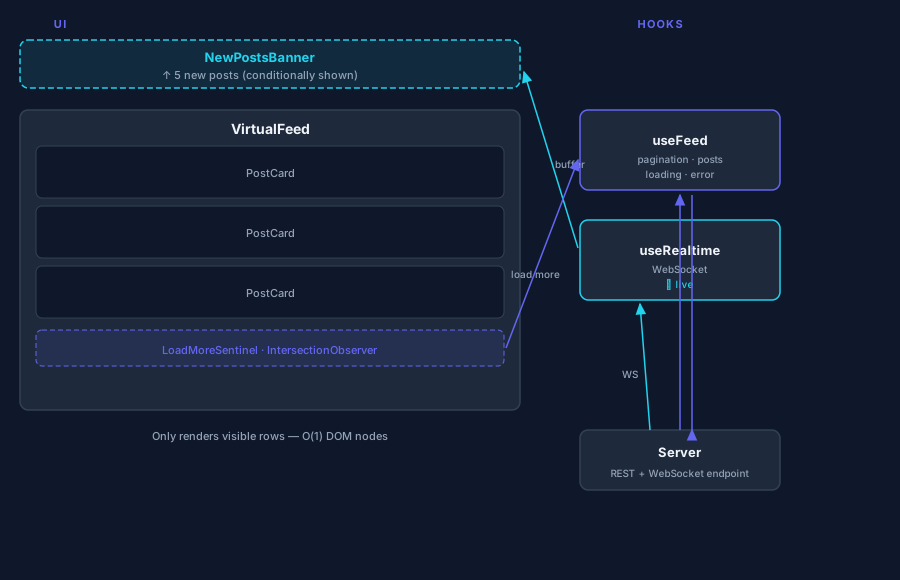
The feed is composed of a few clear layers:
┌────────────────────────────────────────────────────────┐
│                    <FeedPage>                          │
│  ┌─────────────────────────────────────────────────┐  │
│  │           <NewPostsBanner>                      │  │
│  │   "5 new posts — click to refresh"              │  │
│  └─────────────────────────────────────────────────┘  │
│  ┌─────────────────────────────────────────────────┐  │
│  │              <VirtualFeed>                      │  │
│  │  ┌───────────────────────────────────────────┐  │  │
│  │  │  <PostCard> (×N — only visible rendered)  │  │  │
│  │  │    <PostHeader>  avatar, name, time       │  │  │
│  │  │    <PostBody>    text + media             │  │  │
│  │  │    <PostActions> like, comment, share     │  │  │
│  │  └───────────────────────────────────────────┘  │  │
│  │  <LoadMoreSentinel> (IntersectionObserver)      │  │
│  └─────────────────────────────────────────────────┘  │
└────────────────────────────────────────────────────────┘
         │
         ├── useFeed() — fetch, pagination, cache
         └── useRealtime() — WebSocket / SSE new posts
Components:
FeedPage— root, composes everythingNewPostsBanner— "N new posts" prompt (appears on real-time update)VirtualFeed— windowed list, renders only visible cardsPostCard— single post unitPostHeader— avatar, display name, username, timestampPostBody— text with@mention/#hashtagparsing, image/videoPostActions— like, comment, share buttons with countsLoadMoreSentinel— invisible div at list bottom; triggers next page load
Data layer:
useFeed()— manages paginated fetch, caching, merging new postsuseRealtime()— WebSocket/SSE subscription, buffers new post IDsusePostActions()— handles like/comment mutations with optimistic updates
D — Data Model
API Response (paginated feed)
type Author = {
  id: string;
  displayName: string;
  username: string;         // @handle
  avatarUrl: string;
  isVerified: boolean;
};

type Media = {
  type: 'image' | 'video' | 'gif';
  url: string;
  width: number;
  height: number;
  altText?: string;
  thumbnailUrl?: string;    // For video
  durationSeconds?: number; // For video
};

type Post = {
  id: string;
  author: Author;
  content: string;          // Raw text; parse @mentions/#hashtags client-side
  media?: Media[];
  likeCount: number;
  commentCount: number;
  shareCount: number;
  hasLiked: boolean;        // Current user's state
  createdAt: string;        // ISO 8601
  updatedAt: string;
};

type FeedResponse = {
  posts: Post[];
  nextCursor: string | null;  // Cursor-based pagination (not page numbers)
};
Why cursor-based pagination? Offset pagination (?page=2) breaks when new posts are inserted at the top — you get duplicates or skipped posts. Cursors (server-side pointer to "fetch posts after this ID/timestamp") are stable.
Client State
type FeedState = {
  posts: Post[];              // Ordered list (newest first after initial load)
  nextCursor: string | null;
  status: 'idle' | 'loading' | 'loadingMore' | 'error';
  pendingPosts: Post[];       // Real-time arrivals, not yet shown
  hasMore: boolean;
};
Normalisation
For a feed where users can update posts (likes, comments) without refetching, normalise by ID:
type FeedStore = {
  postIds: string[];                  // Ordered feed
  postsById: Record<string, Post>;    // Entity map for O(1) updates
};
When a like action resolves, update postsById[postId].likeCount and the entire feed re-renders correctly.
I — Interface
Feed API
// Initial load
GET /api/feed?limit=20
→ FeedResponse

// Load more (infinite scroll)
GET /api/feed?limit=20&cursor={nextCursor}
→ FeedResponse

// Real-time: new post IDs only (lightweight)
WebSocket: wss://api.example.com/feed/live
→ { type: 'new_posts', postIds: string[] }

// Fetch specific posts by ID (after WS notification)
GET /api/posts?ids=id1,id2,id3
→ { posts: Post[] }
Like Action API
POST /api/posts/{postId}/like
DELETE /api/posts/{postId}/like
→ { likeCount: number, hasLiked: boolean }
Component Props
interface PostCardProps {
  post: Post;
  onLike: (postId: string) => void;
  onComment: (postId: string) => void;
  onShare: (postId: string) => void;
  onAuthorClick: (authorId: string) => void;
}

interface FeedProps {
  userId: string;
}
O — Optimisations
1. Infinite Scroll with IntersectionObserver
Avoid scroll event listeners — they fire on every scroll tick and cause jank. Use IntersectionObserver instead:
const sentinelRef = useRef<HTMLDivElement>(null);

useEffect(() => {
  const observer = new IntersectionObserver(
    ([entry]) => {
      if (entry.isIntersecting && hasMore && status !== 'loadingMore') {
        loadMore();
      }
    },
    { rootMargin: '200px' }  // Start loading 200px before the sentinel
  );
  if (sentinelRef.current) observer.observe(sentinelRef.current);
  return () => observer.disconnect();
}, [hasMore, status]);

// In JSX:
<div ref={sentinelRef} aria-hidden="true" />
The 200px rootMargin means we start fetching before the user actually hits the bottom — feels seamless.
2. Virtualisation (Windowed Rendering)
A feed of 200+ posts with images will kill scroll performance — all those DOM nodes and images exist in memory even when off-screen.
Windowing only renders what's visible:
import { useVirtualizer } from '@tanstack/react-virtual';

const rowVirtualizer = useVirtualizer({
  count: posts.length,
  getScrollElement: () => scrollRef.current,
  estimateSize: () => 300,    // Estimated post height in px
  overscan: 5,                 // Render 5 extra items above/below viewport
});
This keeps the DOM to ~15 nodes regardless of feed length. Critical for long sessions.
Challenge: Posts have variable heights (text-only vs. image vs. video). Use measureElement to measure actual rendered heights and update estimates dynamically.
3. Real-Time Updates Without Flooding the Feed
Inserting new posts directly at the top as they arrive is disorienting — the content the user is reading jumps down. Instead:
- Buffer incoming post IDs in
pendingPosts - Show a banner: "5 new posts"
- On click (or on scroll-to-top): prepend them and clear the buffer
// On WebSocket message
wsRef.current.onmessage = ({ data }) => {
  const { postIds } = JSON.parse(data);
  // Fetch the actual posts
  fetchPostsByIds(postIds).then(newPosts => {
    dispatch({ type: 'BUFFER_NEW_POSTS', posts: newPosts });
  });
};

// Banner
{pendingPosts.length > 0 && (
  <button className="new-posts-banner" onClick={showPendingPosts}>
    ↑ {pendingPosts.length} new {pendingPosts.length === 1 ? 'post' : 'posts'}
  </button>
)}
This is what Twitter/X does — much better UX than auto-inserting.
4. Optimistic UI for Likes
A like action should feel instant. Don't wait for the server:
function handleLike(postId: string) {
  // Optimistic update
  dispatch({ type: 'TOGGLE_LIKE', postId });

  // Server sync
  api.toggleLike(postId).catch(() => {
    // Revert on failure
    dispatch({ type: 'TOGGLE_LIKE', postId });
    showToast('Failed to like — please try again');
  });
}
The UI updates immediately; on error, it silently reverts. Users rarely notice a brief flicker; they always notice a 300ms delay.
5. Image Performance
Feed images are the single biggest performance cost. Key techniques:
Lazy loading: Only load images when they're about to enter the viewport.
<img src={media.url} loading="lazy" alt={media.altText ?? ''} />Correct dimensions: Always set width and height to prevent layout shift (CLS). Use aspect-ratio boxes:
.post-media {
  aspect-ratio: 16 / 9;
  background: var(--skeleton-color);  /* Show while loading */
}
Responsive images: Serve appropriate resolution per screen density:
<img
  srcSet={`${media.url}?w=400 400w, ${media.url}?w=800 800w`}
  sizes="(max-width: 600px) 400px, 800px"
  alt={media.altText ?? ''}
/>
Blur-up placeholders: Show a tiny blurred thumbnail while the full image loads (same technique used by Medium and Gatsby Image).
6. Video Autoplay Strategy
For video posts:
- Autoplay only when in viewport — use IntersectionObserver, mute by default
- Pause when scrolled out — don't burn mobile data in the background
- Preload metadata only (
preload="metadata") — get duration/dimensions without downloading the full video
const videoRef = useRef<HTMLVideoElement>(null);

useEffect(() => {
  const observer = new IntersectionObserver(
    ([entry]) => {
      if (entry.isIntersecting) videoRef.current?.play();
      else videoRef.current?.pause();
    },
    { threshold: 0.5 }  // 50% visible before playing
  );
  if (videoRef.current) observer.observe(videoRef.current);
  return () => observer.disconnect();
}, []);
7. Accessibility
Feed list semantics:
<main aria-label="News Feed">
  <ul role="feed" aria-busy={status === 'loading'}>
    {posts.map(post => (
      <li key={post.id} aria-posinset={index + 1} aria-setsize={-1}>
        <article>
          {/* post content */}
        </article>
      </li>
    ))}
  </ul>
</main>
role="feed" is the ARIA role specifically designed for infinite-scroll content. aria-setsize="-1" tells screen readers the total count is unknown.
Like button:
<button
  aria-label={hasLiked ? 'Unlike post' : 'Like post'}
  aria-pressed={hasLiked}
  onClick={() => onLike(post.id)}
>
  <HeartIcon /> {likeCount}
</button>
Timestamps: Always render timestamps as <time datetime="2026-03-28T12:00:00Z">2h ago</time> — screen readers can speak the full date while users see the relative format.
8. Skeleton Screens
Instead of a spinner, show skeleton cards on initial load — they communicate layout before content arrives and feel faster:
{status === 'loading' && Array.from({ length: 5 }).map((_, i) => (
  <PostSkeleton key={i} />
))}
A PostSkeleton is just CSS animated grey boxes matching the post shape. No JS needed.
9. Offline & Error Handling
| State | What to show |
|---|---|
| No network on initial load | Cached feed from previous session (if available) + offline banner |
| Network lost mid-scroll | Stop fetching, show "You're offline" toast, resume on reconnect |
| API error on initial load | Full-page error state with retry button |
| API error on load-more | Inline error below the last post with retry |
| Like action fails | Optimistic revert + toast notification |
10. Stale-While-Revalidate Caching
Cache the first page of the feed in localStorage or IndexedDB. On next visit:
- Show cached posts immediately (no blank screen)
- Fetch fresh data in background
- Merge/replace when it arrives
This makes the feed feel instant on repeat visits.
Summary
A complete news feed system design covers:
- Requirements: infinite scroll, real-time updates, like/comment actions, media posts, a11y, mobile
- Architecture:
VirtualFeed+PostCard+NewPostsBanner, data inuseFeed+useRealtimehooks, normalised post store - Data model: cursor-based pagination, normalised entity map, real-time post buffering,
hasLikedper-user state - Interface:
GET /api/feed?cursor=, WebSocket for new post IDs,POST/DELETE /api/posts/{id}/like - Optimisations: IntersectionObserver infinite scroll, virtualisation for 60fps, buffered real-time updates, optimistic likes, lazy images with aspect-ratio, video autoplay on viewport, ARIA
role="feed", skeleton screens, offline cache