The chat application question is one of the most demanding frontend system design problems — it covers real-time communication, offline-first architecture, complex state management, message delivery tracking, and multi-tab synchronisation all at once. It's frequently asked at Meta, Slack, OpenAI, and Airbnb.
This article walks through a full RADIO-framework answer. If you're unfamiliar with RADIO, start here.
R — Requirements
Functional requirements:
- List of conversations in a sidebar
- Select a conversation to view message history
- Send and receive text messages in real-time
- Messages show delivery status: Sending → Sent → Delivered → Read
- Works offline — users can browse existing messages without network
- Outgoing messages typed offline are queued and sent when back online
- Draft messages (unsent) persist across sessions
Non-functional requirements:
- Messages feel instant — optimistic UI, no waiting for server confirmation
- Offline usage works gracefully (no crashes, clear status indicators)
- Cross-tab consistency — opening two tabs should show the same messages
- Works on desktop and mobile
Out of scope:
- Group conversations (1:1 only for now)
- Image/file attachments
- Push notifications
- End-to-end encryption
A — Architecture
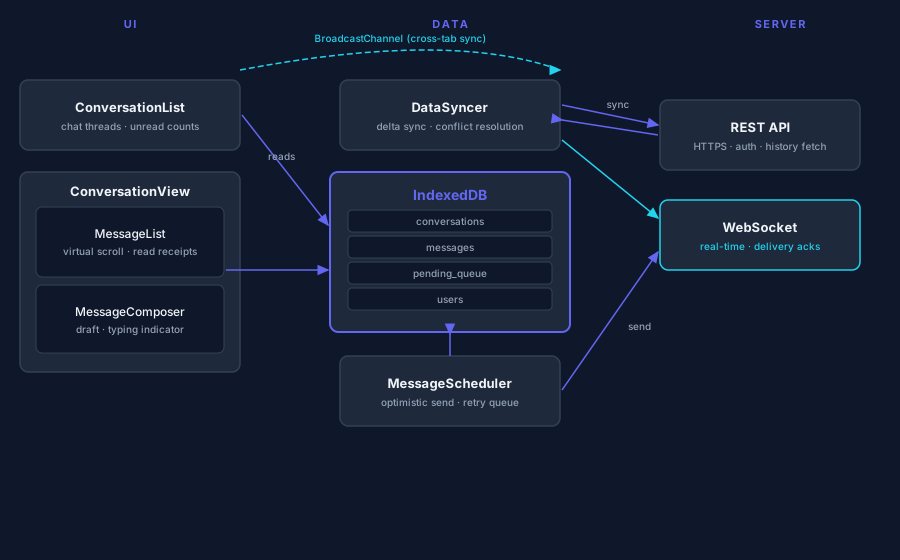
Chat apps have a fundamentally different architecture from typical web apps. The key insight: the UI reads from a local client-side database, not directly from the server. This is what enables offline support and cross-tab consistency.
┌──────────────────────────────────────────────────────────┐
│                      Chat UI                             │
│  ┌──────────────────┐  ┌───────────────────────────────┐ │
│  │ ConversationList  │  │     ConversationView          │ │
│  │  (sidebar)        │  │  ┌─────────────────────────┐ │ │
│  │  - avatar         │  │  │    MessageList          │ │ │
│  │  - last message   │  │  │    (virtualised)        │ │ │
│  │  - timestamp      │  │  └─────────────────────────┘ │ │
│  └──────────────────┘  │  ┌─────────────────────────┐ │ │
│                         │  │    MessageComposer      │ │ │
│                         │  └─────────────────────────┘ │ │
│                         └───────────────────────────────┘ │
└──────────────────────────────────────────────────────────┘
         │ reads from                     │ reads from
         ▼                                ▼
┌─────────────────────────────────────────────────────────┐
│              Controller / Data Layer                     │
│  ┌─────────────────────┐  ┌──────────────────────────┐  │
│  │    IndexedDB         │  │   Message Scheduler      │  │
│  │  (client database)   │  │   (outgoing queue)       │  │
│  └─────────────────────┘  └──────────────────────────┘  │
│  ┌─────────────────────────────────────────────────────┐ │
│  │          Data Syncer                                │ │
│  │   (server sync + WebSocket listener)                │ │
│  └─────────────────────────────────────────────────────┘ │
└─────────────────────────────────────────────────────────┘
         │ syncs with
         ▼
┌─────────────────────────┐
│         Server           │
│  REST API + WebSocket    │
└─────────────────────────┘
Why UI → IndexedDB (not UI → server)?
- Offline reads — IndexedDB works with no network
- Cross-tab consistency — all tabs access the same IndexedDB
- Optimistic writes — insert to local DB instantly, sync to server in background
- Decoupled architecture — UI doesn't care where data came from
Components:
ConversationList— sidebar, sorted by most recent messageConversationView— selected conversation's messages + composerMessageList— virtualised list of message bubblesMessageComposer— input box, sends messages, persists draftsMessageStatusIcon— shows sending/sent/delivered/read state
Data layer modules:
- IndexedDB — the single source of truth for all local data
- Data Syncer — connects to WebSocket, hydrates DB on load, handles incoming events
- Message Scheduler — monitors pending outgoing messages, sends them in order, handles retries
D — Data Model
IndexedDB Tables
// Conversations between two users
type Conversation = {
  id: string;
  participantIds: string[];
  lastMessageId: string;
  lastMessageAt: string;   // ISO — used for sorting sidebar
  updatedAt: string;
};

// Individual messages
type Message = {
  id: string;             // Server-assigned (or temp client ID before sync)
  conversationId: string;
  senderId: string;
  content: string;
  status: 'sending' | 'sent' | 'delivered' | 'read' | 'failed';
  createdAt: string;
  clientId: string;       // Stable ID generated client-side for deduplication
};

// User identities
type User = {
  id: string;
  displayName: string;
  avatarUrl: string;
};

// Unsent draft text per conversation
type DraftMessage = {
  conversationId: string;
  content: string;
  savedAt: string;
  // NOT synced to server — stays on this device
};

// Tracks outgoing messages pending server acknowledgement
type SendMessageRequest = {
  clientId: string;        // Links back to Message.clientId
  conversationId: string;
  content: string;
  status: 'pending' | 'in_flight' | 'failed' | 'success';
  failCount: number;
  lastAttemptAt: string | null;
  createdAt: string;
};
Client-Only State (not persisted)
type UIState = {
  selectedConversationId: string | null;
  scrollPositions: Record<string, number>; // conversationId → scroll offset
  composerDraft: Record<string, string>;   // In-memory; flush to DB on blur/debounce
};
Why Two Draft Stores?
composerDraft(in-memory): Updates every keystroke — too expensive to write to DB on every keyDraftMessage(IndexedDB): Written on blur or every 2s via debounce — survives tab close
I — Interface
Server APIs
// REST: Fetch conversations list on initial load
GET /api/conversations
→ { conversations: Conversation[], users: User[] }

// REST: Fetch message history for a conversation
GET /api/conversations/{id}/messages?before={cursor}&limit=30
→ { messages: Message[], nextCursor: string | null }

// REST: Send a message
POST /api/conversations/{id}/messages
Body: { clientId: string, content: string }
→ { message: Message }
WebSocket Events (server → client)
// New message received from another user
{ type: 'incoming_message', payload: Message }

// Your outgoing message was received by server
{ type: 'message_sent', payload: { clientId: string, messageId: string } }

// Message delivered to recipient's device
{ type: 'message_delivered', payload: { messageId: string } }

// Recipient read the message
{ type: 'message_read', payload: { messageId: string, readAt: string } }

// Sync event on reconnect — server pushes missed data
{ type: 'sync', payload: { conversations: Conversation[], messages: Message[] } }
Component Interface
interface MessageComposerProps {
  conversationId: string;
  onSend: (content: string) => void;
  draft?: string;
  onDraftChange: (draft: string) => void;
}

interface MessageBubbleProps {
  message: Message;
  isMine: boolean;
}
O — Optimisations
1. Message Delivery States
Tracking delivery gives users confidence their message arrived. Five states:
| Status | Indicator | Meaning |
|---|---|---|
sending | Clock / empty circle | In outgoing queue, not yet sent to server |
sent | Single checkmark | Server acknowledged receipt |
delivered | Double checkmark | Delivered to recipient's device |
read | Double blue checkmark | Recipient opened the conversation |
failed | ⚠️ with retry option | Failed after max retries |
Implementation:
// 1. User taps send
function sendMessage(conversationId: string, content: string) {
  const clientId = generateId();

  // Optimistic: write to IndexedDB immediately
  db.messages.add({ clientId, conversationId, content, status: 'sending', ... });
  db.sendMessageRequests.add({ clientId, status: 'pending', failCount: 0, ... });

  // Message Scheduler picks this up and sends to server
}

// 2. Server acknowledges via WebSocket
// { type: 'message_sent', payload: { clientId, messageId } }
db.messages.where({ clientId }).modify({ status: 'sent', id: messageId });
db.sendMessageRequests.where({ clientId }).delete();
2. Message Scheduler & Retry Logic
The scheduler monitors SendMessageRequests and processes them in order:
class MessageScheduler {
  async processQueue() {
    const pending = await db.sendMessageRequests
      .where('status').anyOf(['pending', 'failed'])
      .sortBy('createdAt');

    for (const req of pending) {
      if (req.failCount >= MAX_RETRIES) {
        await db.messages.where({ clientId: req.clientId }).modify({ status: 'failed' });
        await db.sendMessageRequests.where({ clientId: req.clientId }).delete();
        continue;
      }

      const backoffMs = Math.pow(2, req.failCount) * 1000; // 1s, 2s, 4s, 8s...
      if (req.lastAttemptAt && Date.now() - new Date(req.lastAttemptAt).getTime() < backoffMs) {
        continue; // Not ready to retry yet
      }

      await this.sendToServer(req);
    }
  }
}
3. Real-Time: WebSockets vs Alternatives
| Approach | Pros | Cons |
|---|---|---|
| Short polling | Simple, works everywhere | Latency = poll interval; wasteful |
| Long polling | Lower latency than polling | Complex; one connection per conversation |
| WebSocket | True real-time, bidirectional, low overhead | Requires persistent connection mgmt |
| SSE | Simple, built-in reconnect | Unidirectional only |
WebSocket is the right choice for chat. It's what Messenger, Slack, and Discord use. Key considerations:
- Reconnect automatically on disconnect with exponential backoff
- Send a
syncrequest on reconnect to catch up on missed messages - Fall back to long-polling if WebSocket is blocked (corporate firewalls)
class DataSyncer {
  private ws: WebSocket | null = null;

  connect() {
    this.ws = new WebSocket(WS_URL);
    this.ws.onopen = () => this.onReconnect();
    this.ws.onmessage = (e) => this.handleEvent(JSON.parse(e.data));
    this.ws.onclose = () => this.scheduleReconnect();
  }

  private scheduleReconnect(attempt = 0) {
    const delay = Math.min(Math.pow(2, attempt) * 1000, 30000); // cap at 30s
    setTimeout(() => this.connect(), delay);
  }

  private async onReconnect() {
    // Tell server our last-known state so it can send missed messages
    const lastSyncAt = await db.meta.get('lastSyncAt');
    this.ws?.send(JSON.stringify({ type: 'sync', since: lastSyncAt }));
  }
}
4. Cross-Tab Sync with BroadcastChannel
All tabs share the same IndexedDB, but they don't automatically know when another tab modifies it. Use BroadcastChannel to notify sibling tabs:
const bc = new BroadcastChannel('chat-updates');

// When a new message is written to IndexedDB:
bc.postMessage({ type: 'new_message', conversationId, messageId });

// Other tabs listen:
bc.onmessage = ({ data }) => {
  if (data.type === 'new_message') {
    refreshConversation(data.conversationId);
  }
};
This prevents duplicate processing too — only the tab that receives the WebSocket event writes to DB and broadcasts; other tabs just refresh from DB.
5. Offline Detection & Queuing
window.addEventListener('online', () => {
  showToast('Back online — sending queued messages');
  messageScheduler.processQueue();
  dataSyncer.connect();
});

window.addEventListener('offline', () => {
  showBanner('You are offline. Messages will be sent when you reconnect.');
});
Messages typed while offline go into SendMessageRequests with status: 'pending'. The scheduler picks them up the moment the browser goes back online.
One caveat: Don't retry messages that are too old. If a draft was written 30 minutes ago while offline, the conversation may have moved on. Cap retries to messages created within the last 5 minutes.
6. Virtualised Message List
Long conversations (100s of messages) will kill scroll performance if all rendered. Use virtualisation:
import { useVirtualizer } from '@tanstack/react-virtual';

const virtualizer = useVirtualizer({
  count: messages.length,
  getScrollElement: () => listRef.current,
  estimateSize: () => 60,     // Estimated bubble height
  overscan: 10,
  // Reverse list — newest messages at bottom
  paddingStart: 20,
});
Tricky part: scroll anchoring. When new messages arrive at the bottom and the user is already scrolled to the bottom, auto-scroll to show them. When the user has scrolled up to read history, keep their position stable even as new messages append below.
const isAtBottom = listEl.scrollHeight - listEl.scrollTop - listEl.clientHeight < 50;

// After appending new messages:
if (isAtBottom) {
  listEl.scrollTop = listEl.scrollHeight;
}
7. Deduplication
The same message can arrive via both the HTTP response (from a POST /messages) and the WebSocket event (message_sent). Use clientId as the idempotency key:
async function upsertMessage(msg: Message) {
  const existing = await db.messages.where({ clientId: msg.clientId }).first();
  if (existing) {
    await db.messages.where({ clientId: msg.clientId }).modify(msg);
  } else {
    await db.messages.add(msg);
  }
}
8. Draft Persistence
// In MessageComposer
const [draft, setDraft] = useState('');

// Flush to IndexedDB on blur or debounced
const saveDraft = useDebouncedCallback(async (content) => {
  if (content.trim()) {
    await db.draftMessages.put({ conversationId, content, savedAt: new Date().toISOString() });
  } else {
    await db.draftMessages.where({ conversationId }).delete();
  }
}, 1000);

// On mount, restore draft
useEffect(() => {
  db.draftMessages.get(conversationId).then(draft => {
    if (draft) setDraft(draft.content);
  });
}, [conversationId]);
9. Accessibility
// Keyboard shortcuts
document.addEventListener('keydown', (e) => {
  if ((e.metaKey || e.ctrlKey) && e.key === 'ArrowDown') nextConversation();
  if ((e.metaKey || e.ctrlKey) && e.key === 'ArrowUp') prevConversation();
});

// Message composer
<textarea
  aria-label="Message composer"
  onKeyDown={(e) => {
    if (e.key === 'Enter' && !e.shiftKey) {
      e.preventDefault();
      handleSend();
    }
    // Shift+Enter = newline
  }}
/>

// Message list
<div role="log" aria-live="polite" aria-label="Conversation messages">
  {/* New messages are announced by screen readers via live region */}
</div>
10. Progressive Web App (PWA)
Package the app as a PWA to:
- Cache HTML/JS/CSS via Service Worker → loads instantly on repeat visits
- Cache recent messages via the Service Worker → works fully offline
- Enable browser push notifications → "New message from Alice"
Summary
A complete chat app system design covers:
- Requirements: real-time messaging, offline browsing, delivery states, cross-tab consistency, draft persistence
- Architecture: UI reads from IndexedDB (not server), Data Syncer handles WebSocket + REST, Message Scheduler manages outgoing queue
- Data model:
Message,Conversation,User,DraftMessage,SendMessageRequestin IndexedDB;clientIdfor deduplication - Interface: REST for initial load, WebSocket for real-time events (incoming_message, message_sent, delivered, read, sync)
- Optimisations: WebSocket with exponential backoff reconnect, BroadcastChannel for cross-tab sync, exponential backoff retries, virtualised message list, scroll anchoring, optimistic UI, offline queue, PWA for push notifications
The distinguishing insight: treat the client database (IndexedDB) as the source of truth for the UI, not the server. This single architectural decision enables offline support, cross-tab consistency, and instant optimistic updates — all at once.