The autocomplete (or typeahead) question is the most common frontend system design question asked at companies like Google, Meta, Airbnb, and Uber. It looks deceptively simple — "show suggestions as the user types" — but a complete answer covers architecture, state management, performance, accessibility, and API design.
This article walks through a full RADIO-framework answer. If you're not familiar with RADIO (Requirements, Architecture, Data Model, Interface, Optimisations), read the introduction first.
R — Requirements
Start by clarifying scope with the interviewer. Don't assume.
Functional requirements:
- Show a dropdown of suggestions as the user types
- Results update with each keystroke (with debounce)
- Support keyboard navigation (↑↓ to navigate, Enter to select, Escape to close)
- Clicking a suggestion navigates to or selects the result
- Loading state while fetching; error state if the API fails
- Empty state when no results match
Non-functional requirements:
- Suggestions should feel instant — target <150ms perceived latency
- Works on mobile (touch) and desktop (keyboard)
- Accessible to screen reader users
- Handles rapid typing gracefully — no stale results
- Reusable across different search surfaces (global search, within a form, etc.)
Out of scope (for now):
- Spell correction
- Personalised results
- Search history / recently visited
- Multi-select
A — Architecture
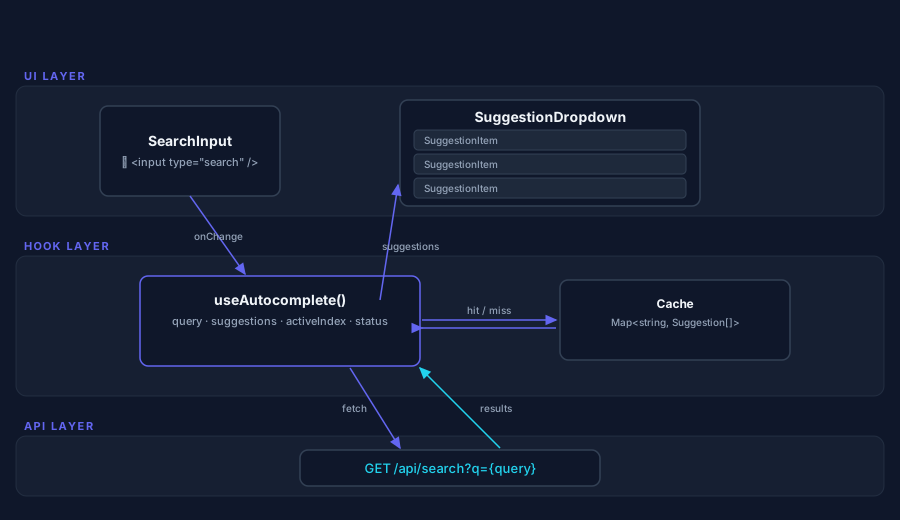
The autocomplete has three main UI concerns: input management, suggestion rendering, and data fetching. Here's how to break it down:
┌─────────────────────────────────────────┐
│           <Autocomplete>                │
│  ┌──────────────────────────────────┐   │
│  │        <SearchInput>             │   │
│  │  [ 🔍  Type to search...      ] │   │
│  └──────────────────────────────────┘   │
│  ┌──────────────────────────────────┐   │
│  │     <SuggestionDropdown>         │   │
│  │  ┌────────────────────────────┐  │   │
│  │  │  <SuggestionItem> (×N)     │  │   │
│  │  └────────────────────────────┘  │   │
│  └──────────────────────────────────┘   │
└─────────────────────────────────────────┘
         │
         │ useAutocomplete() hook
         │
┌────────┴────────────────────────────────┐
│  State: query, suggestions, activeIndex, status │
│  Logic: debounce, fetch, cache, keyboard nav    │
└─────────────────────────────────────────────────┘
         │
         ▼
   GET /api/search?q={query}
Components:
Autocomplete— root, wires everything togetherSearchInput— controlled input with ARIA attributesSuggestionDropdown—ullist, visible when openSuggestionItem— individual result row
Logic (hook):
useAutocomplete— owns all state + side effects: debouncing, fetching, caching, keyboard navigation
Separating logic into a custom hook makes the component reusable and testable independently of the UI.
D — Data Model
API Response
// GET /api/search?q=react&limit=8
type Suggestion = {
  id: string;
  label: string;          // Display text
  url: string;            // Where selecting takes you
  category?: string;      // Optional grouping (e.g. "People", "Pages")
  icon?: string;          // Optional icon URL
  sublabel?: string;      // Optional secondary line (e.g. username, description)
};

type SearchResponse = {
  suggestions: Suggestion[];
  query: string;          // Echo back the query (helps detect stale responses)
};
Client State
type AutocompleteState = {
  query: string;           // Current input value
  suggestions: Suggestion[];
  activeIndex: number;     // -1 = no selection, 0+ = highlighted item
  status: 'idle' | 'loading' | 'success' | 'error';
  isOpen: boolean;
};
Cache
// In-memory Map<query, Suggestion[]>
// Populated on every successful fetch
// Key normalisation: trim + lowercase
const cache = new Map<string, Suggestion[]>();
I — Interface
Component Props
interface AutocompleteProps {
  /** Called on each keystroke; returns suggestions */
  onSearch: (query: string) => Promise<Suggestion[]>;
  /** Called when a suggestion is selected */
  onSelect: (suggestion: Suggestion) => void;
  /** Optional: custom render for each suggestion */
  renderSuggestion?: (suggestion: Suggestion, isActive: boolean) => React.ReactNode;
  placeholder?: string;
  debounceMs?: number;       // Default: 150
  maxSuggestions?: number;   // Default: 8
  minQueryLength?: number;   // Default: 1 (don't fetch on empty input)
  className?: string;
}
Hook Interface
function useAutocomplete(options: {
  onSearch: (query: string) => Promise<Suggestion[]>;
  debounceMs?: number;
  maxSuggestions?: number;
  minQueryLength?: number;
}): {
  query: string;
  suggestions: Suggestion[];
  activeIndex: number;
  status: 'idle' | 'loading' | 'success' | 'error';
  isOpen: boolean;
  // Handlers to spread onto elements
  getInputProps: () => React.InputHTMLAttributes<HTMLInputElement>;
  getListProps: () => React.HTMLAttributes<HTMLUListElement>;
  getItemProps: (index: number) => React.HTMLAttributes<HTMLLIElement>;
}
The prop-getter pattern (getInputProps, getListProps, getItemProps) is borrowed from Downshift — it keeps ARIA wiring, keyboard handlers, and click handlers co-located and ensures nothing gets accidentally forgotten.
Search API
GET /api/search?q={query}&limit={n}

Headers:
  Accept: application/json

Response 200:
  { "suggestions": [...], "query": "react" }

Response 500:
  { "error": "Search service unavailable" }
O — Optimisations
This is the section that separates junior from senior answers. Don't skip it.
1. Debouncing
Without debouncing, typing "react" fires 5 API calls. With 150ms debounce, you fire 1.
const debouncedSearch = useMemo(
  () => debounce(async (q: string) => {
    const results = await onSearch(q);
    setSuggestions(results);
    setStatus('success');
  }, debounceMs),
  [onSearch, debounceMs]
);
Why 150ms? Below ~100ms feels instant; above ~300ms feels laggy. 150ms gives breathing room for typing without perceived delay.
2. Request Cancellation
Rapid typing can cause out-of-order responses — a slow request for "re" arrives after the fast request for "react", clobbering results.
useEffect(() => {
  const controller = new AbortController();

  if (query.length >= minQueryLength) {
    fetch(`/api/search?q=${query}`, { signal: controller.signal })
      .then(r => r.json())
      .then(data => setSuggestions(data.suggestions))
      .catch(err => {
        if (err.name !== 'AbortError') setStatus('error');
      });
  }

  return () => controller.abort(); // Cancels on next render
}, [query]);
3. Client-Side Caching
Typing "rea", deleting back to "re", then retyping "rea" would fire the same request three times. Cache the results:
const cache = useRef(new Map<string, Suggestion[]>());

async function search(q: string) {
  const key = q.trim().toLowerCase();
  if (cache.current.has(key)) {
    setSuggestions(cache.current.get(key)!);
    return;
  }
  const results = await fetchSuggestions(q);
  cache.current.set(key, results);
  setSuggestions(results);
}
Cap the cache size (e.g. 100 entries) to prevent unbounded memory growth in long sessions.
4. Accessibility (ARIA)
This is non-negotiable for a complete answer. The ARIA combobox pattern:
// Input
<input
  role="combobox"
  aria-expanded={isOpen}
  aria-haspopup="listbox"
  aria-autocomplete="list"
  aria-controls="autocomplete-list"
  aria-activedescendant={
    activeIndex >= 0 ? `suggestion-${activeIndex}` : undefined
  }
/>

// Dropdown
<ul
  id="autocomplete-list"
  role="listbox"
  aria-label="Search suggestions"
>
  {suggestions.map((s, i) => (
    <li
      key={s.id}
      id={`suggestion-${i}`}
      role="option"
      aria-selected={i === activeIndex}
    >
      {s.label}
    </li>
  ))}
</ul>
Also: announce result count when suggestions load — "8 results available" via a live region.
5. Keyboard Navigation
| Key | Behaviour |
|---|---|
↓ | Move activeIndex down (wraps to 0 from bottom) |
↑ | Move activeIndex up (wraps to last from top) |
Enter | Select activeIndex item (or submit form if no selection) |
Escape | Close dropdown, return focus to input |
Tab | Close dropdown, move focus naturally |
Home | Move to first suggestion |
End | Move to last suggestion |
6. Mobile Considerations
- Minimum touch target size: 44×44px per WCAG 2.1
- Suggestions should be large enough to tap easily
- On iOS,
input[type="search"]gets special styling — considertype="text"with a search icon if you need consistency - Virtual keyboard appearing shifts the layout — ensure the dropdown doesn't get hidden behind it (use
position: fixedor scroll management)
7. Performance for Large Lists
If suggestions can be many (e.g. 50+), consider windowing — only render visible items. Libraries like react-window or react-virtual handle this. For typical autocompletes (≤10 items), it's overkill.
8. Empty and Error States
{status === 'loading' && <Spinner />}
{status === 'error' && <p>Something went wrong. Please try again.</p>}
{status === 'success' && suggestions.length === 0 && (
  <p>No results for "{query}"</p>
)}
Always render something — never leave the dropdown visually broken or silently empty.
The Full Implementation Sketch
function Autocomplete({ onSearch, onSelect, placeholder = 'Search...' }: AutocompleteProps) {
  const {
    query,
    suggestions,
    activeIndex,
    status,
    isOpen,
    getInputProps,
    getListProps,
    getItemProps,
  } = useAutocomplete({ onSearch });

  return (
    <div className="autocomplete">
      <input
        className="autocomplete__input"
        placeholder={placeholder}
        {...getInputProps()}
      />
      {isOpen && (
        <ul className="autocomplete__list" {...getListProps()}>
          {status === 'loading' && <li className="autocomplete__loading">Loading...</li>}
          {status === 'error' && <li className="autocomplete__error">Failed to load results</li>}
          {status === 'success' && suggestions.length === 0 && (
            <li className="autocomplete__empty">No results for "{query}"</li>
          )}
          {suggestions.map((s, i) => (
            <li
              key={s.id}
              className={`autocomplete__item ${i === activeIndex ? 'autocomplete__item--active' : ''}`}
              onClick={() => onSelect(s)}
              {...getItemProps(i)}
            >
              {s.label}
            </li>
          ))}
        </ul>
      )}
    </div>
  );
}
Summary
A complete autocomplete system design answer covers:
- Requirements: keyboard + mouse nav, debounce, loading/error/empty states, a11y
- Architecture:
Autocomplete→SearchInput+SuggestionDropdown, logic inuseAutocompletehook - Data model:
Suggestiontype from API, client state (query, suggestions, activeIndex, status), in-memory cache - Interface: prop-getter pattern for ARIA wiring, clean
onSearch/onSelectcallbacks, REST endpoint - Optimisations: debounce (150ms), AbortController, client cache, ARIA combobox, keyboard nav, mobile touch targets, empty/error states
The question isn't testing whether you know every detail — it's testing whether you can think systematically about a real product problem.